museaicode.cc

Muse AI Code · Community invite board

Share Muse AI invite codes

Redeem a code and get 1 billion free Muse tokens — or share yours and earn more every time it's used. Community votes help the working codes rise to the top.

1000 live codesHow to redeem a code →

Share your code, earn tokens

Every time someone redeems your invite code, you both get 1 billion Muse tokens. Post it here and let the community put it to work.

Tip: you can paste Muse's whole invite message — we'll find the code.

1000 Invite Codes

Ranked by freshness and community votes. Votes are not verified redemptions.

Showing 913–936 of 1000

  1. #913
    LRK9UT
  2. #914
    ZG5VGL
  3. #915
    Y8RDR0
  4. #916
    MYAEOW
  5. #917
    4ZQ70C
  6. #918
    SVUNUR
  7. #919
    TVBA69
  8. #920
    R61X1E
  9. #921
    L2H0CP
  10. #922
    ONB2ZF
  11. #923
    LEINRV
  12. #924
    TPWP8C
  13. #925
    Z5LRAD
  14. #926
    66I07C
  15. #927
    ARNBNN
  16. #928
    CF8I2P
  17. #929
    BEFL9R
  18. #930
    GWHQT6
  19. #931
    TCR93K
  20. #932
    FNEJSF
  21. #933
    2GHDT8
  22. #934
    Z42AK1
  23. #935
    PRFTY7
  24. #936
    L1LWQM

AFTER YOU REDEEM

Got a code? See what Muse can do.

Your code unlocks 1 billion free tokens. These three guides show where to spend them.

FAQ

Questions about invite codes

How do I use a Muse invite code?
  1. 1Create a Muse account at muse.ai.
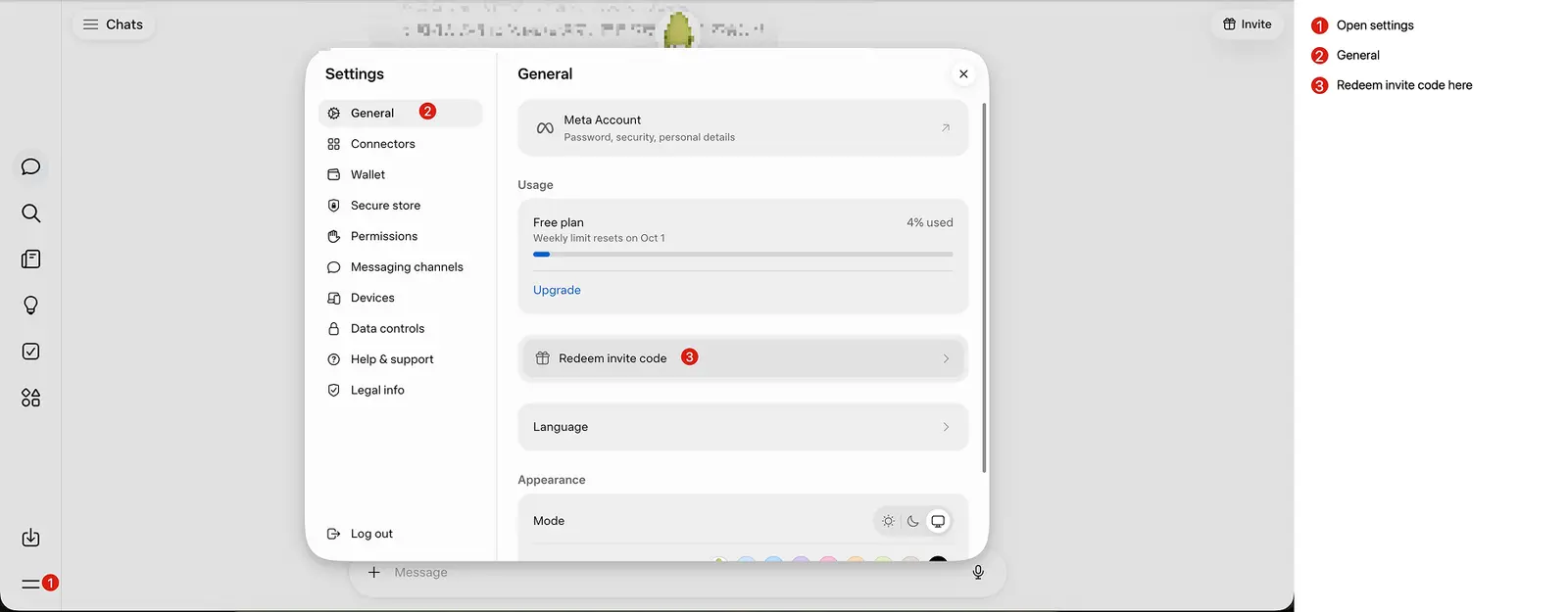
  2. 2Within 48 hours of signing up, open Settings → General → Redeem invite code. On the web, Settings is in the ☰ menu at the bottom-left; in the iPhone app the option is called “Redeem referral code”.
  3. 3Paste the 6-character code and confirm. You and the person who shared the code each get 1 billion Muse tokens.
Muse on the web: open the menu at the bottom-left, choose General in Settings, then click Redeem invite code.
Where to redeem on the web: ☰ menu → General → Redeem invite code. Tap the image to enlarge.

Then come back and vote on the code, so the next person knows whether it still works.

Why isn't my invite code working?
  • The code is used up. Each code can only be redeemed a limited number of times (currently 30), so popular codes run out fast. Try one near the top of the list or one that was shared recently.
  • Your 48-hour window has passed. Codes can only be redeemed within 48 hours of creating your account, and the window can't be extended.
  • Muse isn't available in your region yet. Muse is currently available in the US, Canada, Japan (launched 2026-10-23), Singapore (launched 2026-10-27), and Mexico (launched 2026-11-05); invite codes can't unlock closed regions.
  • A typo. Codes are easy to mistype (0 vs O, 1 vs I). Use the Copy button instead of typing.

If a code fails because it's used up, give it a thumbs down. Codes with lots of thumbs down are hidden automatically.

How do I get my own invite code?

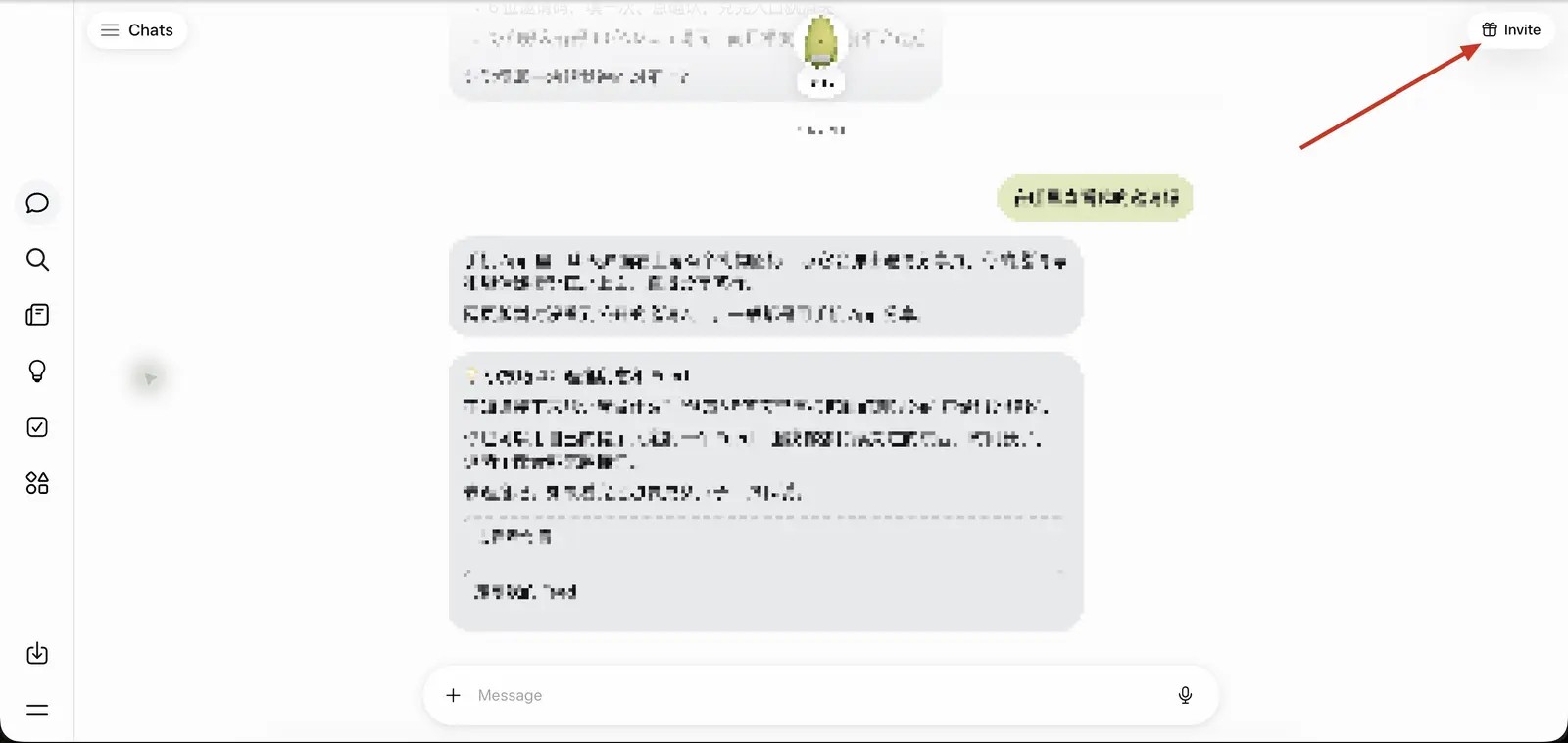
Once you have a Muse account, tap the Invite (gift) button in the top-right corner of the app to see your personal code. Every time someone redeems it, you get another 1 billion Muse tokens.

The Invite button with a gift icon in the top-right corner of Muse.
The Invite button in the top-right corner of Muse. Tap the image to enlarge.

Share it here with the form above, so people who need a code can find it.

How are codes ranked?
  • Votes and freshness. Positive and negative votes each have a limited effect on ranking, so a large vote count cannot keep an old code at the top. Codes can only be redeemed a limited number of times (currently 30).
  • Bad codes sink. Codes with lots of thumbs down are hidden automatically.
  • One active vote per code and visitor identifier — click again to undo it. Upvotes and downvotes are each limited to one per minute by IP and browser identifier. Votes are self-reported and are not verified with Muse.
  • Protected submissions. Every new code passes a human-verification check and is rate limited.

Muse invite code

ONB2ZF

0 👍 · 0 👎

Redeem it and you both get 1 billion Muse tokens.

How to redeem

  1. 1Create a Muse account at muse.ai.
  2. 2Within 48 hours of signing up, open Settings → General → Redeem invite code. On the web, Settings is in the ☰ menu at the bottom-left; in the iPhone app the option is called “Redeem referral code”.
  3. 3Paste the 6-character code and confirm. You and the person who shared the code each get 1 billion Muse tokens.

Tried it? Close this and vote on the code, so others know whether it still works.

Share this code

museaicode.cc/?code=ONB2ZF